Personal project · Solo · In development
Hemma
A Swedish-first iPhone app for people who own a house or a bostadsrätt apartment: one place for what the home needs, what has been done to it, and the documents that prove it. It’s my own project and still in development. The log, the document vault and the spending overview work today. The maintenance calendar, the core of the idea, does not exist yet. There is no release and there are no users.
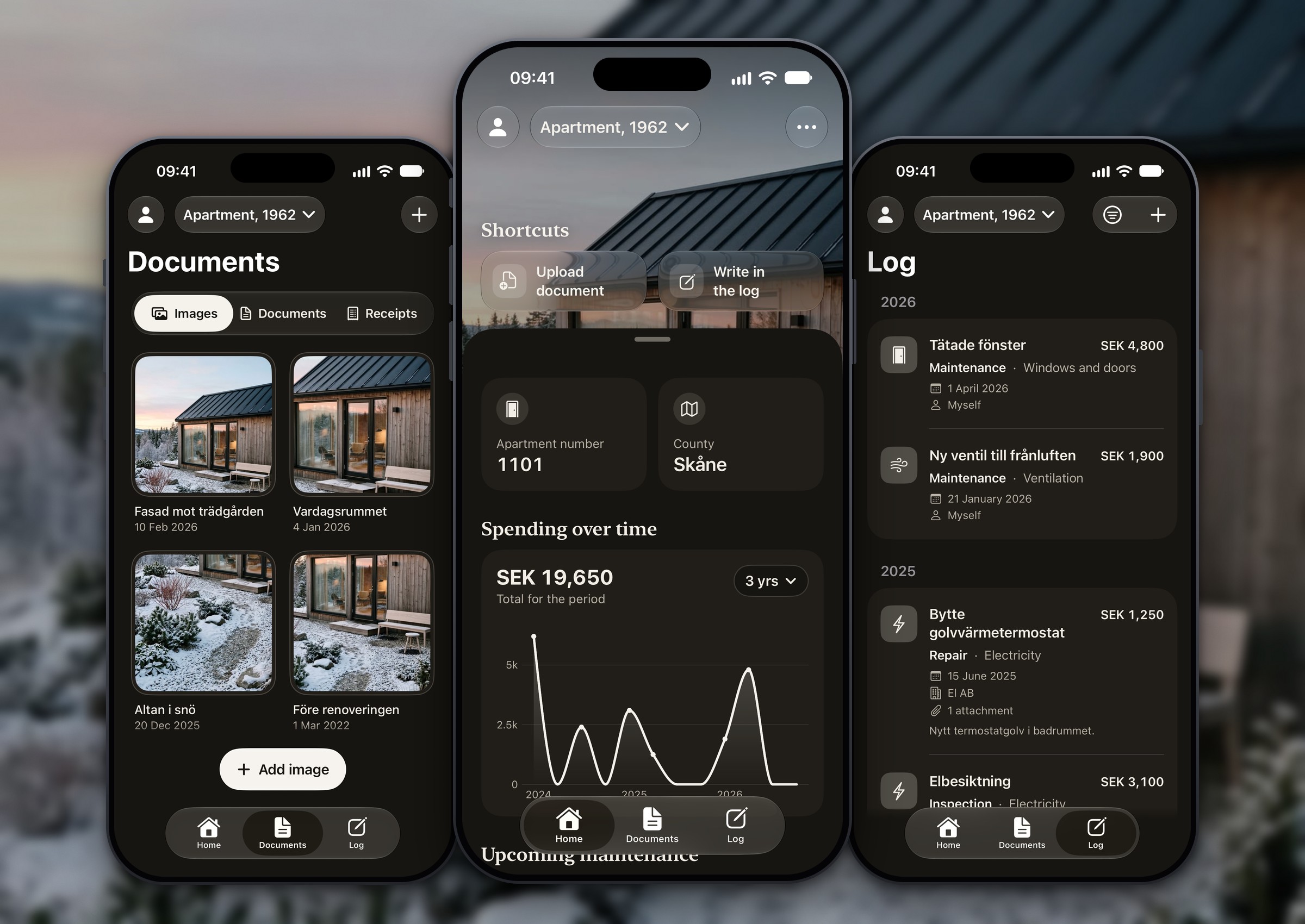
Outcome Snapshot
Role
Product designer and iOS builder. I wrote the scope, designed the app, and direct the SwiftUI build one step at a time with Claude Code.
Timeline
October 2026 – present. Still in Phase 1: the first twelve build steps are done.
Team
Solo and self-initiated. No client, no users yet, and no interviews yet (they are planned).
Problem
Owners keep home maintenance in their heads, and apartment owners often can’t tell what is theirs to fix and what belongs to the association.
Measurable outcomes
- Built and running in the simulator: three tabs (Home, Documents, Log) for homes and for vehicles, a 10-question setup for a house and a 13-question setup for an apartment.
- More than 450 unit tests cover the task engine, onboarding, spending maths, file storage and translations (counted in the test folder, 15 October 2026).
- No accounts, no network calls and no third-party packages: everything stays on the phone (checked in the source, 15 October 2026). The login screen at launch is a design placeholder.
1. 30-second summary
Hemma is an iPhone app for people who own a house or a bostadsrätt apartment in Sweden. The idea is simple: one place to see what your home needs, what has been done to it, and the documents behind it. I’m designing it and building it step by step, as a personal project.
Today you can set up a house, an apartment or a vehicle, write a log of jobs and their costs, keep photos, receipts and certificates, and see your spending over time. Everything stays on the phone, in Swedish or English. What does not exist yet is the maintenance calendar, which is the core of the idea. The app says so itself: ‘The maintenance calendar isn’t ready yet.’
This page covers the problem, how I decided what to build, and what is built versus what is only planned.
2. Problem + constraints
Owning a home in Sweden means a steady flow of things to remember, and the problem looks different for a house than for a bostadsrätt apartment. Hemma started from that difference.
House owners
Maintenance is a stream of small jobs that are easy to forget until something breaks: gutters, outdoor taps before the frost, ventilation filters, heat pump service, roof checks. Most owners keep it in their heads, on paper, or not at all. About 1.9 million households live in an owner-occupied small house (SCB, 2025). Their question is ‘what does my house need, and when?’
Apartment owners (bostadsrätt)
The owner looks after the inside of the apartment, and the association (the bostadsrättsförening, BRF) looks after the building. Where that line falls is set by law and by each association’s stadgar (bylaws), and it is disputed in practice: one Supreme Court case turned on how a set of stadgar defined ‘the apartment’s floor’. Owners often don’t know what is theirs, which renovations need the board’s permission, or how old the bathroom’s waterproofing is. About one in five households (21%) lives in a bostadsrätt, and in Stockholm county it is the most common form of housing (SCB, 2025). Their question is ‘what is mine, what is the association’s, and what needs permission?’
Both
When a home is sold, its history is mostly lost: what was done, by whom, and which documents prove it. Owners also struggle to find the papers when they need them for insurance, a permit question or a sale.
Constraints
- Solo and part-time, so the scope is cut hard. Phase 1 has no accounts, no backend and no sharing: everything stays on the device.
- No user research yet. Interviews with house owners, apartment owners and board members are planned but not done, so the problem rests on public sources and on assumptions that my scope document marks as unverified.
- Maintenance advice and responsibility rules need expert review before they ship: a home inspector for houses, someone who knows BRF rules for apartments. Until then the content is placeholder, and the app ships none of it.
- Every association’s stadgar differ, so apartment guidance can only be a baseline. It has to read as general guidance, never as a fact about the user’s association.
- Swedish first and English second, with accessibility built in from the first screen.
3. My role + ownership boundaries
I owned
- The scope: who the app is for, the evidence, what is in and out of Phase 1, the data model and the build plan.
- All UX and UI: every screen, flow, state and word, in Swedish and English.
- The rules for trust: what the app may and may not claim, and how it shows uncertainty.
- Direction and review of the SwiftUI build, one step at a time, checked on the simulator.
I shared
- The Swift code. Claude Code writes it from my step-by-step briefs; I decide what is built next and what ships.
- A decision log that records, for each change, what I asked for, what changed, and what is verified and what is not.
Out of scope
- Accounts and a backend, and sharing a home with other people.
- Tenants (hyresrätt), ägarlägenheter and Android.
- A contractor directory, bookings and reviews, and anything for estate agents.
- Reading the stadgar automatically.
4. Design approach
I set these principles before drawing a screen, and I build in short, logged steps. An app people rely on has to earn trust before it tries to be clever.
Calm, not nagging
No streaks, no guilt, no daily pings. Planned: reminders that follow the seasons, plus one monthly summary.
Honest about what it doesn’t know
‘I don’t know’ is always an answer. The app shows only what the owner entered and never presents a default as a fact. Planned: apartment guidance labelled as general guidance, with the stadgar as the authority.
Minimal and native
Warm near-black, serif headings, no accent beyond white and near-black, and system components wherever they fit.
Local-first
No accounts and no network calls. Files stay on the device.
Swedish first, accessible
Swedish source text with English alongside. Dynamic Type, VoiceOver labels, Reduce Motion and contrast are built into each screen. Planned: a full VoiceOver test.
5. Solution
Hemma has three tabs: Home (the home’s overview), Documents (the document vault) and Log (the log of everything done). They are Hem, Dokument and Logg in Swedish. A home or a vehicle is added once, in a short setup. After that everything belongs to it, and you can switch between several from the top bar.
Here is what exists today, in the order a new user meets it. All screens are from the iOS Simulator, set to English, with sample data. The first decision below shows Home in detail.
A short start, and no dead ends
The first run is a skippable four-page introduction, then your name, then a choice: add a home, add a vehicle, or do it later. ‘Later’ goes straight into the app, which explains why it is empty and offers the same two buttons. Nothing is required except your name, and the name stays on the phone.
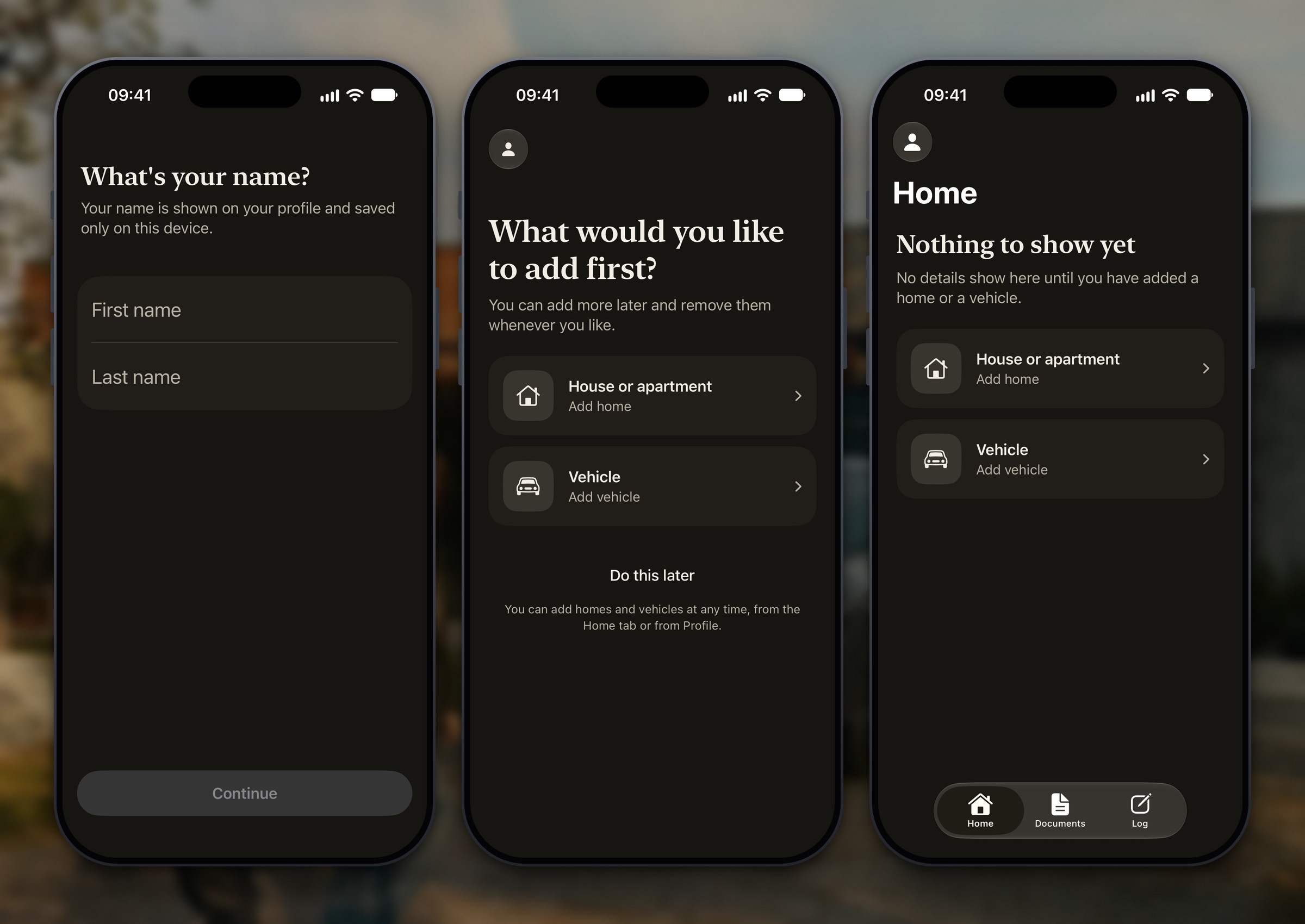
Set up a home in about a dozen questions
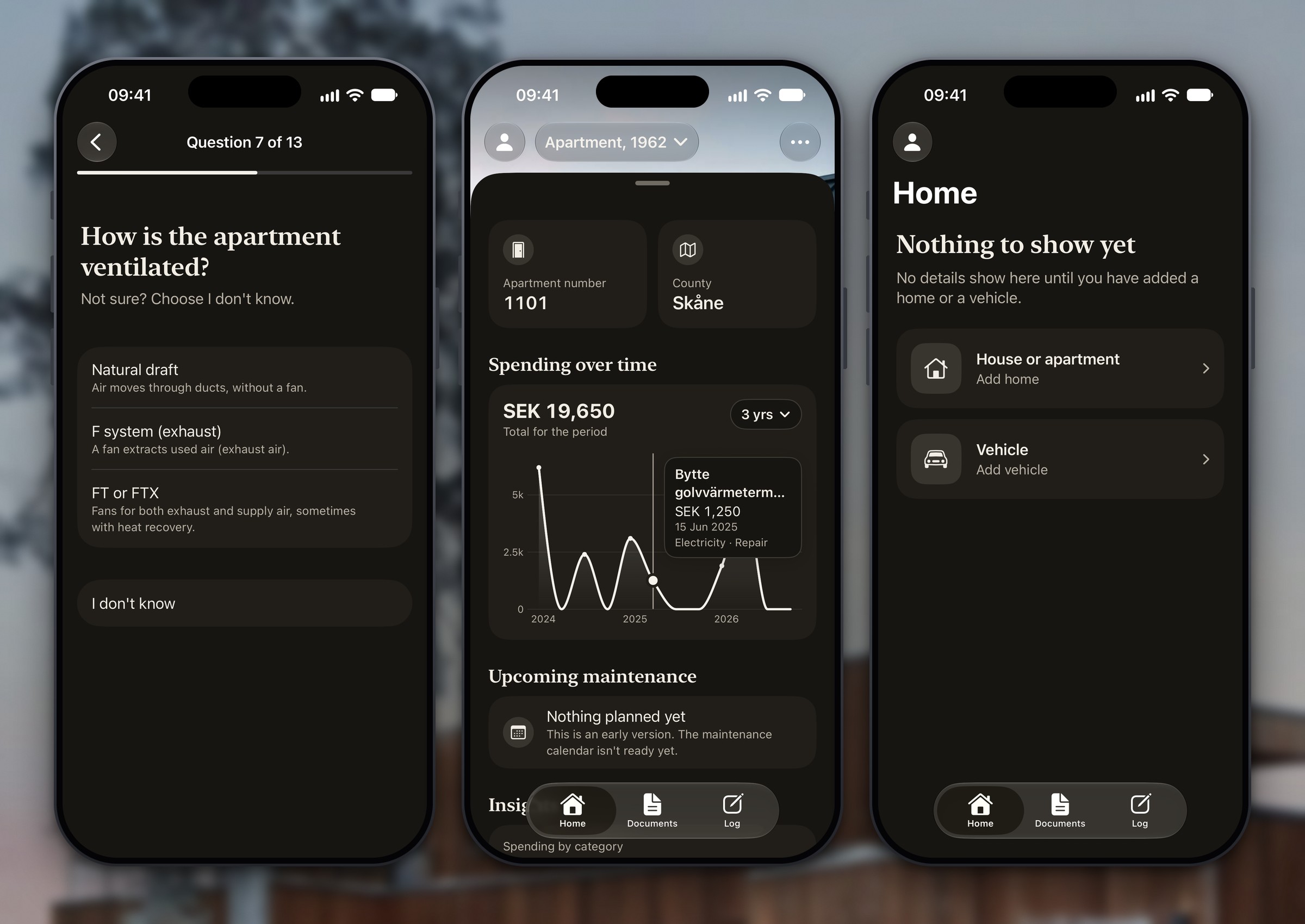
Setting up a house takes 10 questions and an apartment 13: year built, ventilation, heating, or floor, apartment number and balcony, when the bathroom and kitchen were last renovated, and which county (län) the home is in. ‘I don’t know’ is an option wherever someone might not know. The first screen is also honest about scope: Hemma is for houses and bostadsrätter, and rental apartments aren’t supported yet.
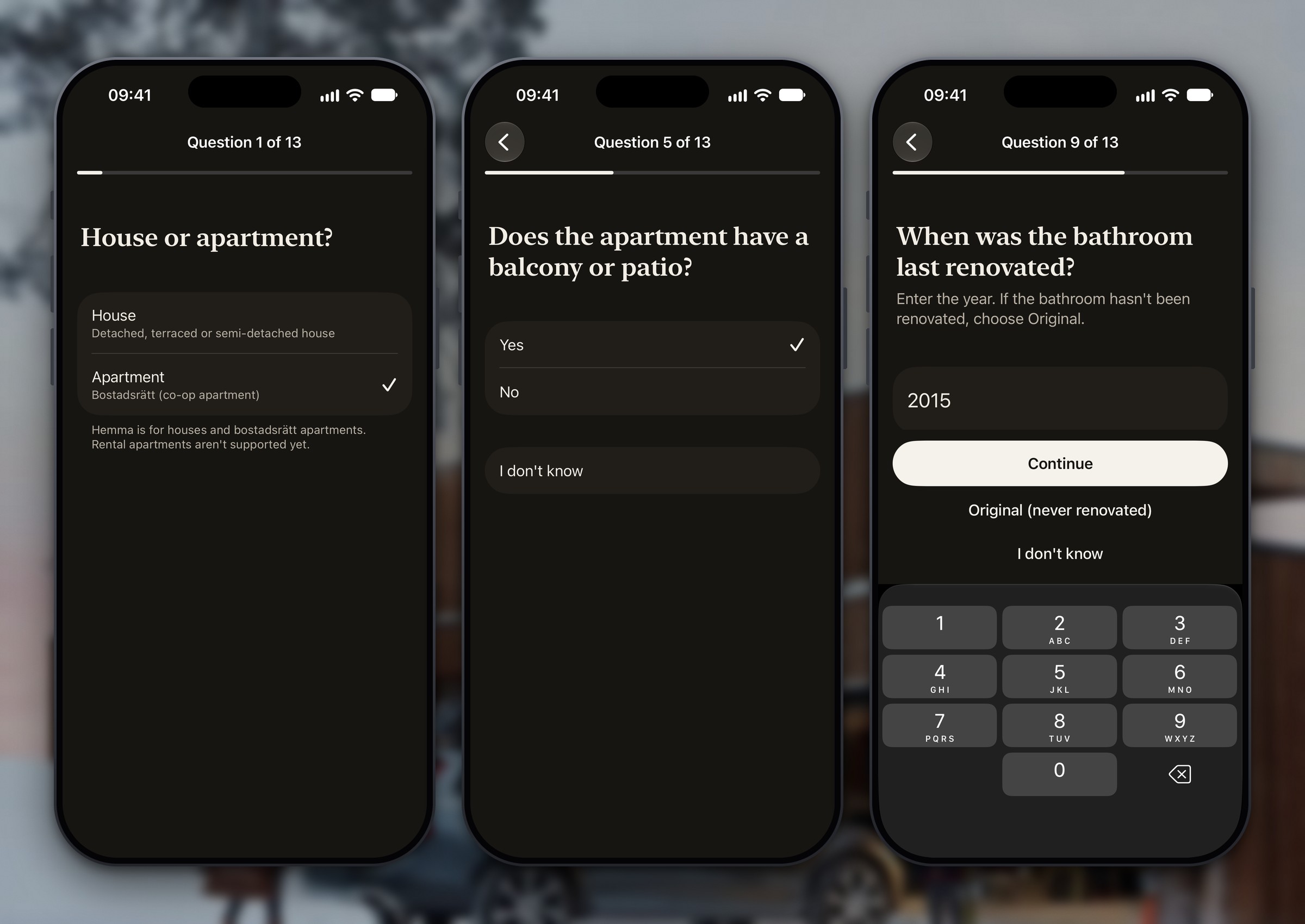
Documents and the log
Documents keeps photos (Images), papers such as certificates and insurance letters (Documents) and receipts (Receipts). Each is added from Photos or Files and stored on the phone. Log is a timeline of what has been done: date, type, category, cost, who did it, notes and attachments, filterable by category and year. A receipt can be attached to a log entry, so a cost and its proof sit together.
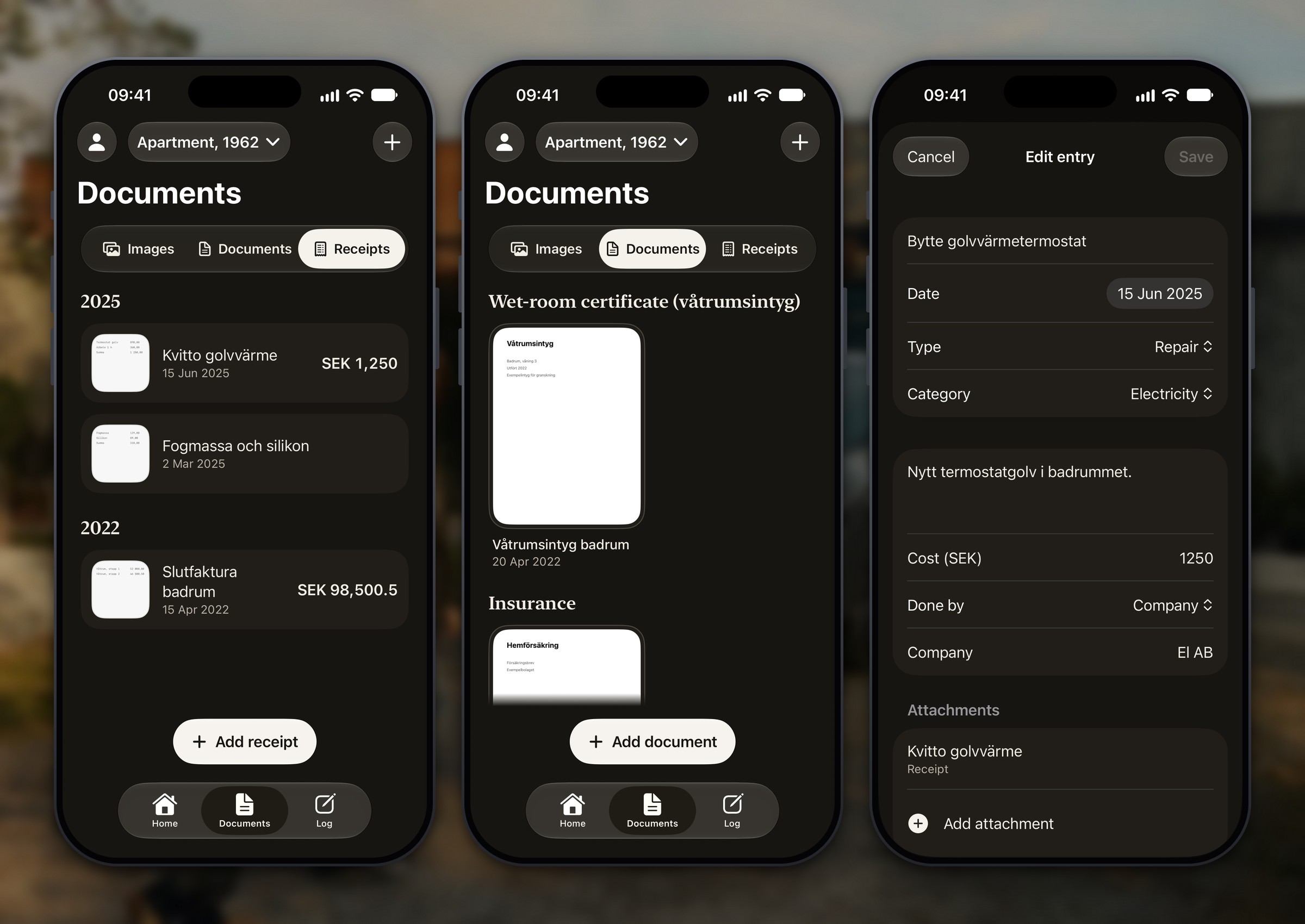
Built
Working in the app today
- Setup of a house, an apartment or a vehicle.
- Several homes and vehicles, switched from the top bar.
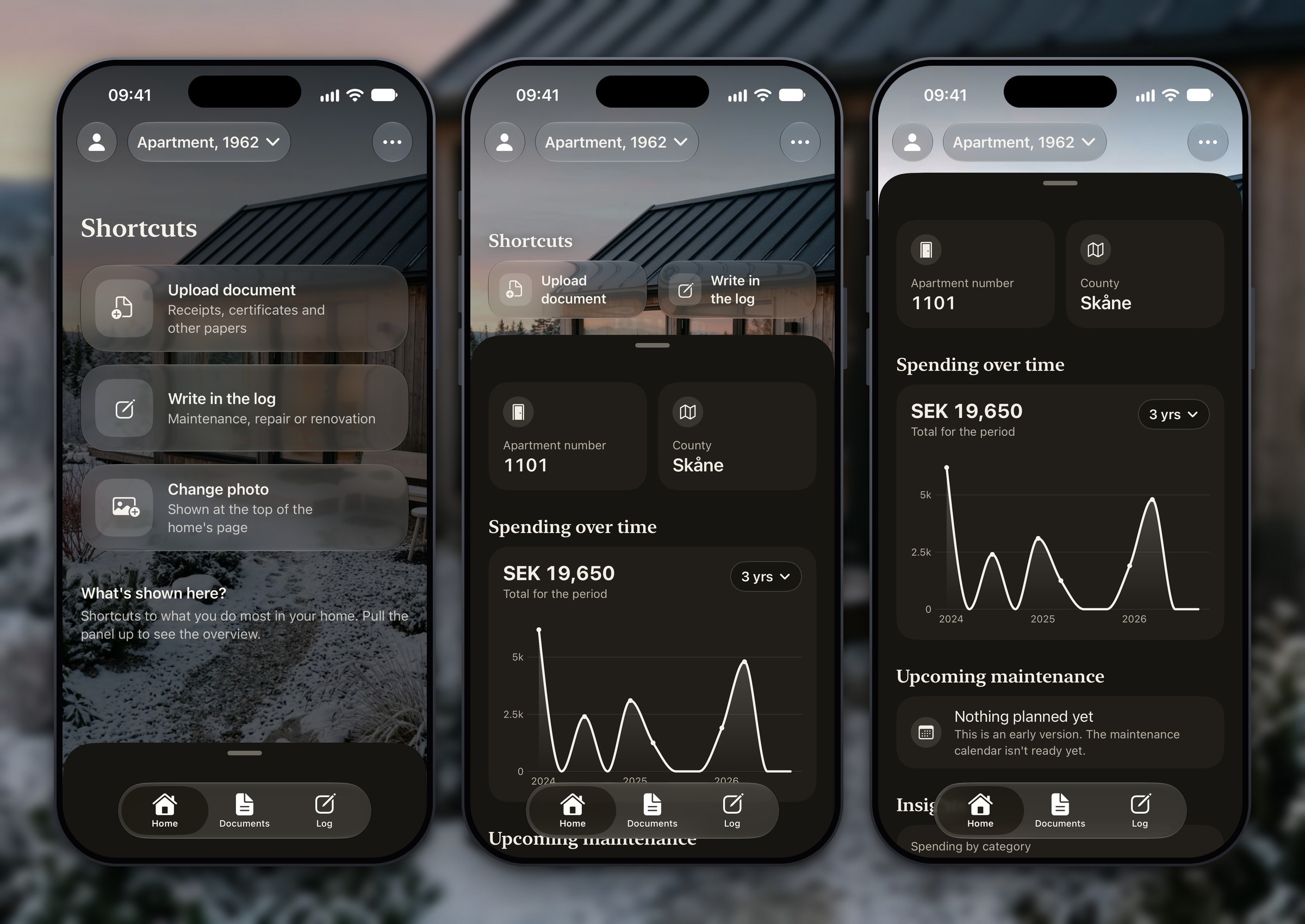
- Home: the home’s photo, shortcuts, two cards with facts you gave, a spending chart with six ranges that you can press and drag to read, insights from your own log, and the home profile.
- Documents: photos, documents and receipts, added from Photos or Files and kept on the phone.
- Log: jobs with date, type, category, cost, who did it, notes and attachments, with filters.
- Vehicle: the same pattern for cars, motorcycles, mopeds, motorhomes and trailers, with registration number, mileage, and inspection and insurance dates.
- Profile: your name, light or dark, Swedish or English. Every screen is translated.
- Local-first: no accounts and no network calls. The login screen is a placeholder.
Planned
Not built yet
- The maintenance calendar: a personalised list of tasks by season. The engine behind it is written and tested, but no task content ships yet.
- Reminders: local notifications at the right time of year, and a gentle monthly summary.
- For apartments: a responsibility guide (‘Who is responsible for what’, Vem ansvarar för vad in Swedish), an Association screen, a renovation-permission check and a wet-room tracker.
- PDF export of the log and the document list, and scanning papers with the camera.
- Reviewed content: every task and rule needs a source and a reviewer before it ships.
- Later phases, not started: sharing a home’s history, a contractor directory, bookings and reviews.
‘Planned’ means planned. Nothing in the second list is in the app, and the app says so where it matters: the Upcoming maintenance card says ‘The maintenance calendar isn’t ready yet’.
6. Key decisions
1. Put the home’s own photo behind the numbers
Decision
Home shows the home’s own photo, with the overview in a sheet that sits at three heights: shortcuts over the photo, the overview, and all the detail.
Why
A home manager can feel like admin. The photo makes the app personal, and the sheet keeps the first view short: two shortcuts for what you do most (upload a paper, write in the log), two cards with facts about the home, and the spending chart. You pull up for more.
Result
One calm first view, with the maintenance card, the insights and the home profile one swipe away. A dark layer that follows the sheet keeps the text readable over any photo. The same layout is used for apartments, houses and vehicles.
2. Show only what the owner entered, and say so when there is nothing
Decision
Every figure on Home comes from what the owner entered. On the chart, press and drag to see the exact log entry behind each dot. A fact the owner didn’t give reads ‘I don’t know’ on its card, and with no data the insights say ‘No data available’. The maintenance card says ‘The maintenance calendar isn’t ready yet’ instead of filling the space with placeholder tasks. I also removed an estimate of how a renovation might affect a home’s value, because the percentages behind it had no source.
Why
The app is about what you can rely on. An invented number or a guessed rule costs more trust than an empty state, and for apartments a default must never read as a fact about someone’s association.
Result
On Home and Vehicle, every figure is a sum or a count of the owner’s own entries, and nothing is estimated. Placeholders that remain in the project are written down in a content-sources file, with why they have no source.
3. One pattern for homes and vehicles
Decision
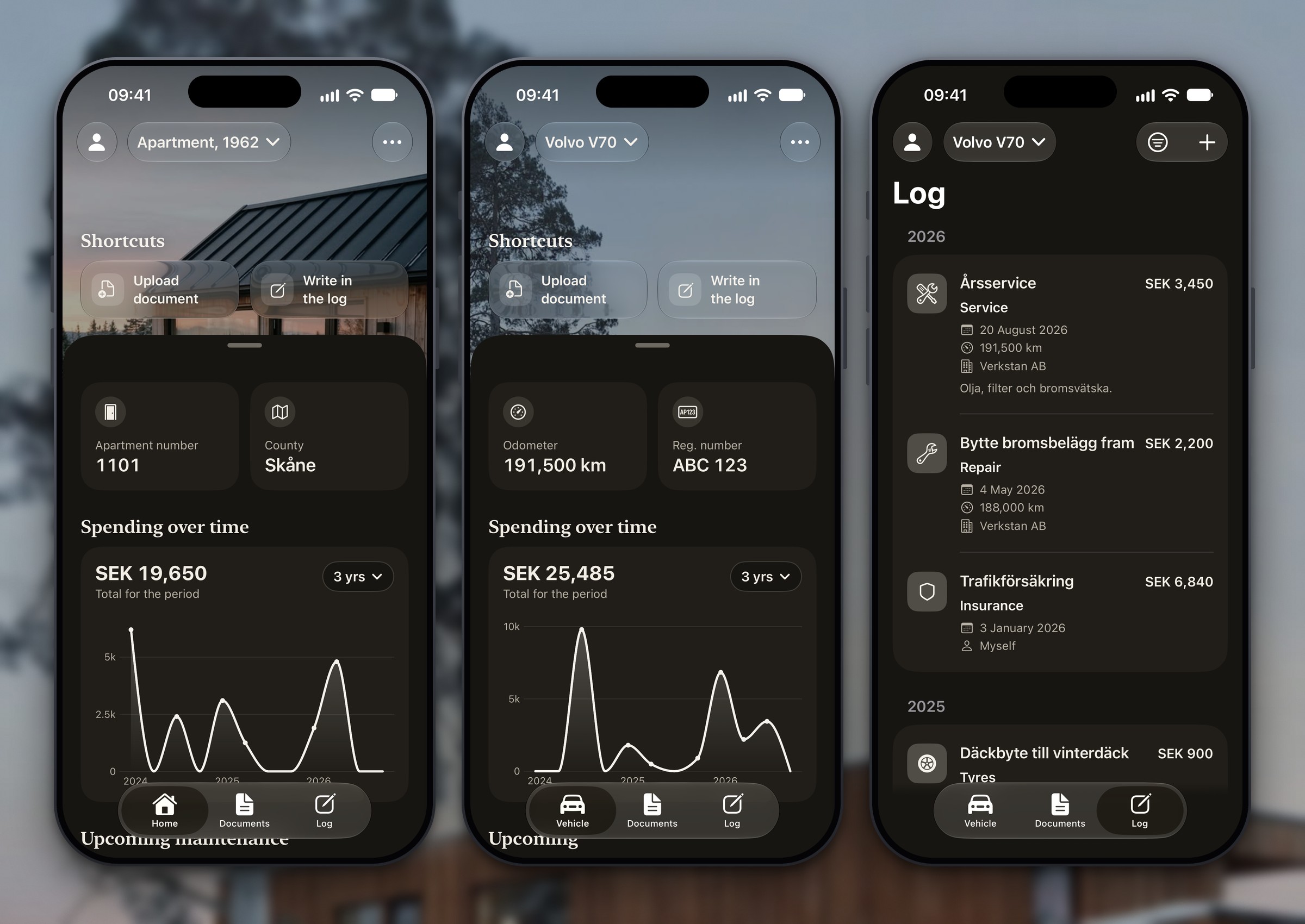
When I added vehicles I reused Home, Documents and Log instead of designing a second app. A vehicle gets a photo, a sheet, a log with costs and mileage, and its own document vault.
Why
A car has the same jobs as a home: what was done, what it cost, where the papers are. One pattern means one thing to learn, plus shared code and tests. Vehicles weren’t in the original scope, so this was a later addition.
Result
The tab bar switches between Home and Vehicle and everything else behaves the same. A vehicle’s top cards show mileage and registration number instead of apartment number and county, and an ‘Upcoming’ card lists only the inspection and insurance dates the owner typed in. Hemma never looks anything up in a register and never works out a legal date.
4. Keep it on the phone, in two languages, from the start
Decision
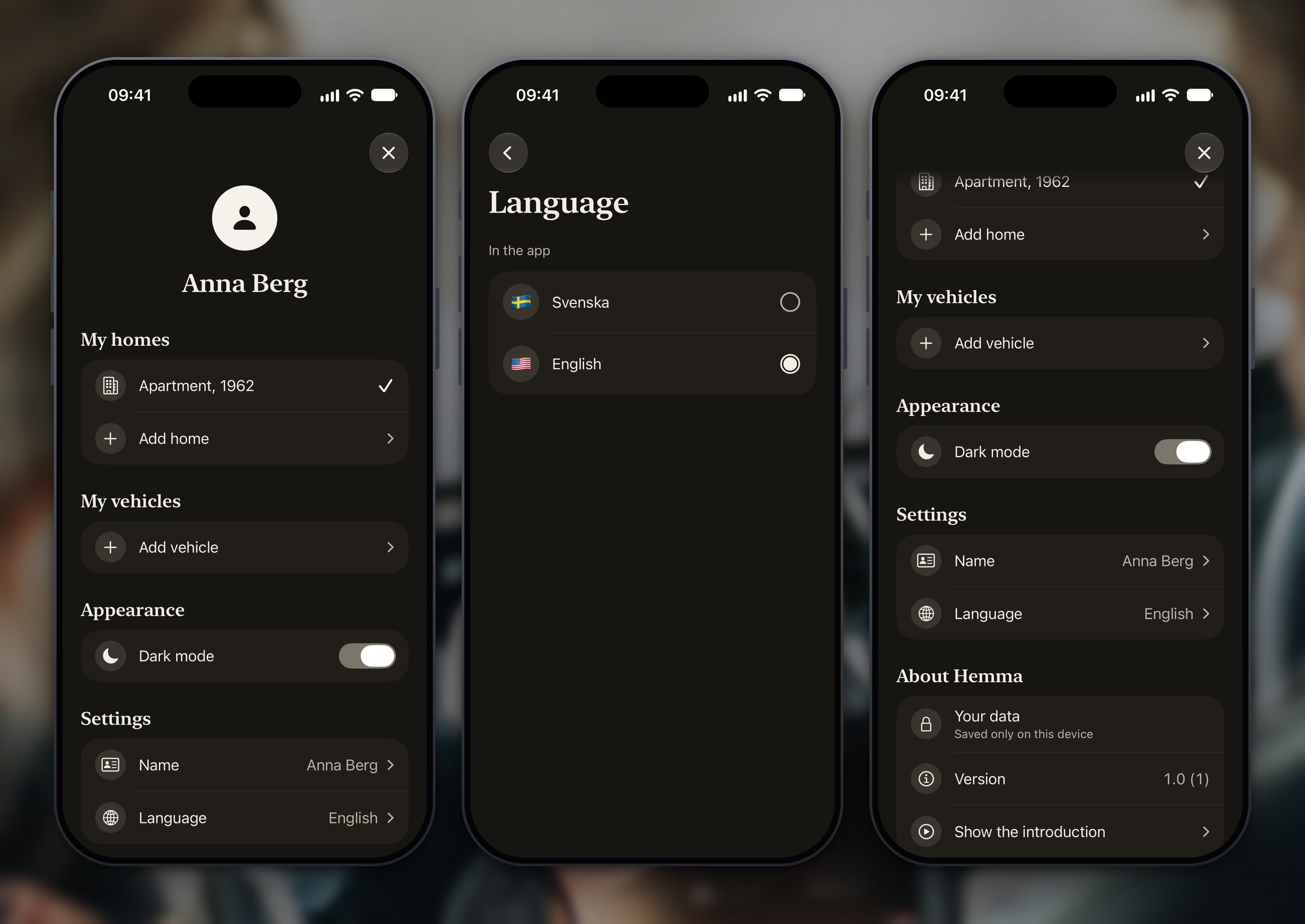
Phase 1 has no accounts and makes no network calls, and files stay on the device. Every text is written in Swedish and translated to English through one function. Dark and light, Dynamic Type, VoiceOver labels and Reduce Motion are handled screen by screen.
Why
Receipts, certificates and association documents are personal. Swedish is the source language because the content is Swedish (bostadsrätt, stadgar, våtrumsintyg), and I keep those terms with a short English gloss. Adding any of this later would mean touching every screen.
Result
Switching language rebuilds every screen at once, and about 400 texts are translated. The profile says ‘Saved only on this device’. The English has not been read by a native speaker yet, and a full VoiceOver test is still to do.
Skills & tools
Design
Product design (UX/UI)
The scope, information architecture, flows and every screen, in Swedish and English, plus written rules for tone and trust.

Development
iOS development (SwiftUI)
Directed and reviewed a SwiftUI and SwiftData build with Swift Charts and Liquid Glass, no third-party packages, one tested step at a time.
7. Where it stands
Hemma is in development with no release and no users, so there are no usage numbers. This is what exists, counted from the project on 15 October 2026.
Measured
3 tabs, 2 kinds
What you can do today
Home, Documents and Log, for homes and for vehicles. Setup takes 10 questions for a house and 13 for an apartment. A vehicle takes 11, or 9 for a trailer.
Measured
450+ tests
Unit tests in the project
They cover the task engine, onboarding rules, spending maths, file storage and translations. They run in a scratch package for now; an Xcode test target is still to be set up.
Measured
0 network calls
Everything stays on the phone
No network code in the source, no package dependencies in the project and no accounts. The login screen is a placeholder.
Measured
2 languages
Swedish and English throughout
Swedish is the source text and about 400 texts have an English translation, checked by tests for matching placeholders. The English has not been read by a native speaker.
These are counts from my own project, not results from users. Onboarding completion, retention and the other success metrics in my scope need a released build and real owners.
8. What’s next
- Build the maintenance calendar: 60–80 task templates for houses and apartments, each with a source, shown as a ‘this month’ list and a year view. The engine exists; the content does not.
- Get the content reviewed before it ships: a home inspector for the house tasks, and someone who knows BRF rules for the apartment guidance.
- Add reminders: local notifications at the right time of year and one gentle monthly summary, never daily.
- Build the apartment features: the responsibility guide, the Association screen, the renovation-permission check and the wet-room tracker, all framed as general guidance with the stadgar as the authority.
- Add PDF export of the log and the documents, the start of a shareable home history.
- Talk to owners: interviews with house owners, apartment owners and board members, then a TestFlight with 10–20 owners, before anything goes to the App Store.